Managing Fan Pages
Last updated: April 18, 2026
Every Facebook ad runs under a Fan Page (Facebook Page) as its public identity. In Wevion, the Pages screen gives you a single view of every Fan Page imported from your connected Meta accounts, letting you manage connection status, filter by business, and assign pages — all without switching to Meta Business Manager.
Prerequisites
An Wevion account with an active subscription (or active free trial).
At least one Meta account connected to Wevion. If you have not done this yet, see Connecting Your Meta (Facebook) Account.
Your connected Meta accounts must have at least one Fan Page associated with a Business Manager.
How It Works
Wevion imports Fan Pages automatically when you connect a Meta account:
Initial import — Wevion scans every authorized Business Manager and pulls in all Fan Pages (name, ID, business, ownership type).
Ongoing sync — Each sync re-checks Meta for all Business Managers, marking pages as active or removing stale references.
Token validation — A page is marked Connected only after Wevion confirms a valid token has the necessary permissions. Pages without a valid token show as Disconnected.
Viewing Your Fan Pages
Navigate to Pages in the left sidebar (under Assets).
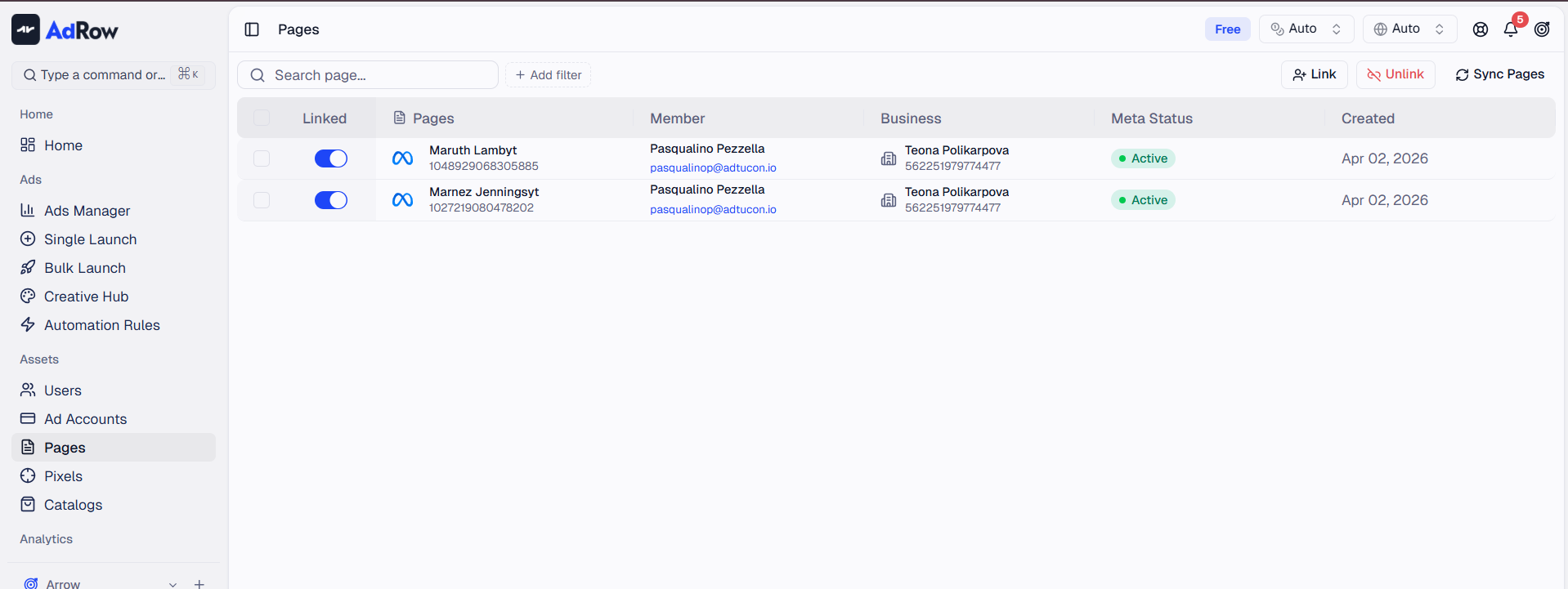
ColumnWhat It Shows | |
Page | Fan Page name and numeric Meta Page ID |
Business | Business Manager name and ID |
Connection | Connected (green) or Disconnected (gray) |
Status | Active, Inactive, or Unknown |
Created | Date first imported into Wevion |
Summary badges at the bottom show Total, Connected, and Active page counts.
Filtering and Searching
Search by page name or ID. Filter by Connection (Connected/Disconnected), Status (Active/Inactive), Business, or Created date. Sort by clicking any column header.
Assigning and Unassigning Fan Pages
Only connected (assigned) pages can be used in campaigns.
To assign: Select pages via checkboxes, click Assign, and confirm. Wevion validates the token in the background.
To unassign: Select pages, click Unassign, and confirm. Pages remain in your list as Disconnected and can be re-assigned anytime.
Note: Unassigning only disconnects from Wevion — the page continues to exist normally on Facebook.
Connecting a New Meta Account
To bring in pages from a new Business Manager, click Connect to open the Meta authorization flow. New pages appear after sync completes. Connecting Your Meta (Facebook) Account
Fan Pages in Campaign Creation
When creating a campaign, you must select a Fan Page as the ad's public identity. The selector shows only pages that are connected and accessible through the same token and ad account. You can also pick an existing post from your Fan Page as the ad creative.
Launching Your First Campaign — Step by Step | Creating Ad Creatives — Images, Videos, and Copy
Page Limits by Plan
PlanMax Connected Fan Pages | |
Starter | 5 |
Pro | 25 |
Agency | Unlimited |
Exceeding your limit blocks the action. Either unassign existing pages or upgrade your plan. If you downgrade, the system will block the downgrade until you manually remove excess pages.
Team View (For Owners and Admins)
Owners, Admins, and Super Admins see additional Member and Team columns. Use the member filter to view pages belonging to a specific team member.
Syncing and Data Freshness
Click Sync Pages (refresh icon) to trigger an immediate sync from Meta. Wevion re-validates tokens, updates names, and removes stale references. Syncing Your Meta Assets — How It Works
Frequently Asked Questions
Why does a page show as "Disconnected" even though it is in my Business Manager? The token that imported the page has expired or been revoked. Click Connect to re-authorize, then sync and assign again.
Can I rename a Fan Page from Wevion? No. Page names are managed on Facebook and reflected in Wevion after sync.
What does "Unknown" status mean? Wevion has not received a definitive status from Meta yet. It usually resolves after the next sync.
I assigned a page, but it still shows as "Disconnected." Assignment runs in the background. Wait 10-15 seconds and refresh. If it persists, try reconnecting your Meta account.
How many Fan Pages can I have total? No limit on total pages. Plan limits only apply to connected (assigned) pages.
Do I need a separate Fan Page for each ad account? No. One page can be used across multiple ad accounts within the same Business Manager. Each ad must specify exactly one Fan Page.
Can I use a personal Facebook profile instead of a Fan Page? No. Meta requires all ads to run under a Fan Page.