Upgrading or Downgrading Your Plan
Last updated: April 18, 2026
Learn how to change your Wevion plan, what happens during an upgrade or downgrade, and the 30-day cooldown policy.
Prerequisites
An active Wevion subscription (trial or paid)
Owner role (only workspace owners can change plans)
At least 30 days since your last plan change (cooldown policy)
How It Works
You can change your plan at any time from the Billing page. Wevion supports both upgrades (moving to a higher plan) and downgrades (moving to a lower plan). Plan changes take effect immediately.
Key rules:
30-day cooldown: After changing your plan, you must wait 30 days before changing again. The next available change date is shown in the UI.
Proration: When you upgrade, Stripe calculates a prorated charge for the remaining billing period. When you downgrade, you receive a prorated credit.
Trial behavior: If you change plans during your trial, the trial ends immediately and billing begins right away.
Step-by-Step Guide
Upgrading Your Plan
Navigate to Billing in the left sidebar
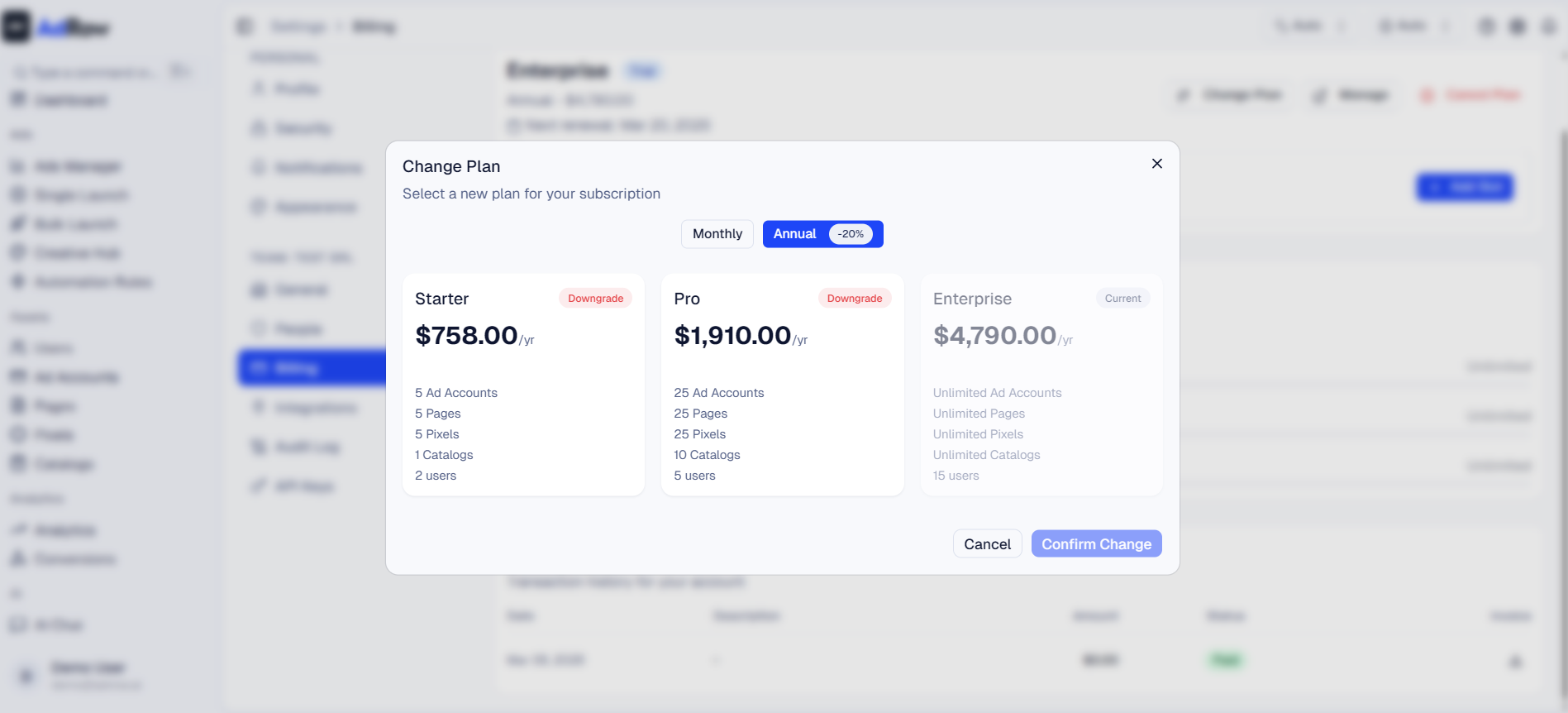
Click Change Plan
Available plans are displayed with features and pricing
Your current plan is marked with a "Current" badge
Select the plan you want to upgrade to
Choose your billing interval (Monthly or Annual)
Click Confirm Change
The change takes effect immediately:
Your new plan limits are applied right away
A prorated charge is added to your next invoice
The 30-day cooldown starts
Downgrading Your Plan
Downgrading works the same way as upgrading, with one important difference: if your current resource usage exceeds the new plan's limits, Wevion will automatically disconnect excess resources.
Navigate to Billing > Change Plan
Select a lower plan
A downgrade warning will be shown listing potential impacts:
Ad accounts with the lowest 30-day spend will be disconnected first
Least recently used fan pages, pixels, and catalogs will be disconnected
Excess team members may have their access suspended
Review the warning carefully
Click Downgrade to confirm
Changes take effect immediately
Important: Review your resource usage in the Usage section before downgrading. Knowing which resources will be affected helps you prepare.
Checking the Cooldown Status
Navigate to Billing
If a cooldown is active, the Change Plan button will show the next available date
Example: "Next plan change available on April 15, 2026"
You cannot change your plan until this date passes
What Happens During a Plan Change
Upgrade Scenario
BeforeAfter | |
Professional plan (5 users, 3 ad accounts) | Enterprise plan (15 users, unlimited ad accounts) |
No resources disconnected | New limits available immediately |
Prorated charge for remaining period | Added to next invoice |
Downgrade Scenario
BeforeAfter | |
Enterprise plan (8 connected ad accounts) | Professional plan (3 ad accounts max) |
5 ad accounts auto-disconnected (lowest spend) | 3 accounts remain connected |
Prorated credit issued | Applied to next invoice |
What Gets Automatically Disconnected on Downgrade
ResourceDisconnection Logic | |
Ad accounts | Lowest 30-day spend disconnected first |
Fan pages | Least recently used disconnected first |
Pixels | Least recently used disconnected first |
Catalogs | Least recently used disconnected first |
Team members | Excess members are automatically deactivated when you downgrade to a plan with fewer slots. Deactivated members can be reactivated if you upgrade again or purchase additional slots. |
Options and Configuration
SettingDescription | |
Plan | Choose between Starter, Professional, Enterprise |
Billing interval | Monthly or Annual — changing interval counts as a plan change |
Cooldown | 30 days between plan changes |
Proration | Handled automatically by Stripe |
FAQ
Why is there a 30-day cooldown? The cooldown prevents rapid plan switching and ensures billing consistency. It also gives you time to evaluate your new plan before making another change.
Can I bypass the cooldown? No. The 30-day cooldown is enforced for all users, including Owners. Contact support for exceptional cases.
Will I lose data when I downgrade? No data is deleted. Disconnected ad accounts and other resources are simply unlinked — you can reconnect them if you upgrade again. Campaign data, historical spend, and reports are never affected.
What if I'm on a trial and want to change plans? You can change plans during your trial, but the trial will end immediately and billing begins. The 30-day cooldown also applies.
Can I change from monthly to annual billing? Yes. Changing your billing interval (even on the same plan) is treated as a plan change. It's subject to the 30-day cooldown and may trigger proration.
How is proration calculated? Stripe calculates the unused portion of your current plan and applies it as a credit toward the new plan. You'll see the prorated amount on your next invoice.