Understanding Campaign Metrics
Last updated: April 18, 2026
This article explains every metric available in Wevion's Ads Manager — what it means, how it's calculated, and when to use it.
Prerequisites
Access to the Ads Manager Ads Manager Overview — Your Campaign Control Center
At least one active or recently active campaign with data
How It Works
Wevion displays two categories of metrics:
Meta Metrics — Data reported directly by Meta (Facebook/Instagram), synced automatically from your ad accounts
Postback Metrics — Conversion data sent to Wevion from your tracking system via server-to-server postbacks Postback Conversions — Server-to-Server Tracking
Some metrics are reported directly by Meta, while others are calculated by Wevion from the raw data.
Metric Reference
Delivery Metrics
These metrics tell you how many people your ads reached and how they interacted with them.
MetricDefinitionSource | ||
Impressions | The total number of times your ads were displayed. One person can see your ad multiple times. | Meta |
Reach | The number of unique people who saw your ad at least once. | Meta |
Frequency | The average number of times each person saw your ad. Formula: | Calculated |
Clicks | The total number of clicks on your ad (includes all click types). | Meta |
Inline Link Clicks | Clicks that lead to a destination (your website, app, etc.). More relevant than total clicks for performance analysis. | Meta |
CTR (Click-Through Rate) | The percentage of impressions that resulted in a click. Formula: | Calculated |
Cost Metrics
These metrics help you understand how efficiently you're spending your budget.
MetricDefinitionSource | ||
Spend | The total amount spent during the selected period. | Meta |
CPC (Cost per Click) | How much each click costs on average. Formula: | Calculated |
CPM (Cost per Mille) | The cost per 1,000 impressions. A standard industry benchmark for ad costs. Formula: | Calculated |
Daily Budget | The maximum amount per day allocated to this campaign or ad set. Shows the most recent value. | Meta |
Lifetime Budget | The total budget allocated for the entire campaign/ad set duration. Shows the most recent value. | Meta |
Bid Amount | The bid cap or cost cap amount set on the ad set (if using Bid Cap, Cost Cap, or Min ROAS strategy). | Meta |
Conversion Metrics (Meta)
These metrics track actions that happen after someone interacts with your ad, as reported by Meta.
MetricDefinitionSource | ||
Purchases | The number of purchase events tracked by your Meta Pixel or Conversions API. | Meta |
Purchase Value | The total monetary value of all purchase events. | Meta |
Leads | The number of lead events tracked by your Meta Pixel or Conversions API. | Meta |
Add to Cart | The number of add-to-cart events tracked on your website. | Meta |
Conversions | The total number of conversion events (includes purchases, leads, and other conversion types). | Meta |
Cost per Purchase | Average cost to acquire one purchase. Formula: | Calculated |
Cost per Lead | Average cost to acquire one lead. Formula: | Calculated |
Cost per Add to Cart | Average cost per add-to-cart event. Formula: | Calculated |
Profitability Metrics (Meta-based)
These metrics calculate your return on ad spend using Meta's reported conversion values.
MetricDefinitionSource | ||
Profit (Meta) | Your net profit based on Meta conversion data. Formula: | Calculated |
ROI (Meta) | Return on Investment percentage. Formula: | Calculated |
ROAS | Return on Ad Spend. Shows as a multiplier. Formula: | Calculated |
AOV (Average Order Value) | Average revenue per purchase. Formula: | Calculated |
Postback Metrics
These metrics come from your external tracking system via server-to-server postbacks. They provide an independent view of conversions, separate from Meta's reporting.
MetricDefinitionSource | ||
PB Conversions | Number of conversions reported by your tracking system. | Postback |
PB Revenue | Total revenue reported by your tracking system. | Postback |
PB Profit | Net profit based on postback data. Formula: | Calculated |
PB ROI | Return on Investment based on postback data. Formula: | Calculated |
Why both Meta and Postback metrics? Meta's reporting uses its own attribution model, which may differ from your tracking system. Comparing both gives you a fuller picture of your true performance. Postback Conversions — Server-to-Server Tracking
Budget & Configuration Columns
ColumnDescription | |
Objective | The campaign's goal (Sales, Leads, Traffic, etc.) — Campaign level only |
Bid Strategy | The bidding approach (Lowest Cost, Bid Cap, Cost Cap, Min ROAS) |
Account Name | The Meta ad account running this campaign |
Account Status | Whether the ad account is active, disabled, or under review |
Team Columns (Owner/Admin View)
These columns are only visible to workspace owners, admins, and super admins:
ColumnDescription | |
Team Member | The name and email of the team member who owns this campaign's ad account |
Team Name | The team/workspace name (visible to super admins only) |
Step-by-Step Guide
Reading the Summary Bar
At the top of the Ads Manager, the summary bar shows aggregated totals across all campaigns matching your current filters:
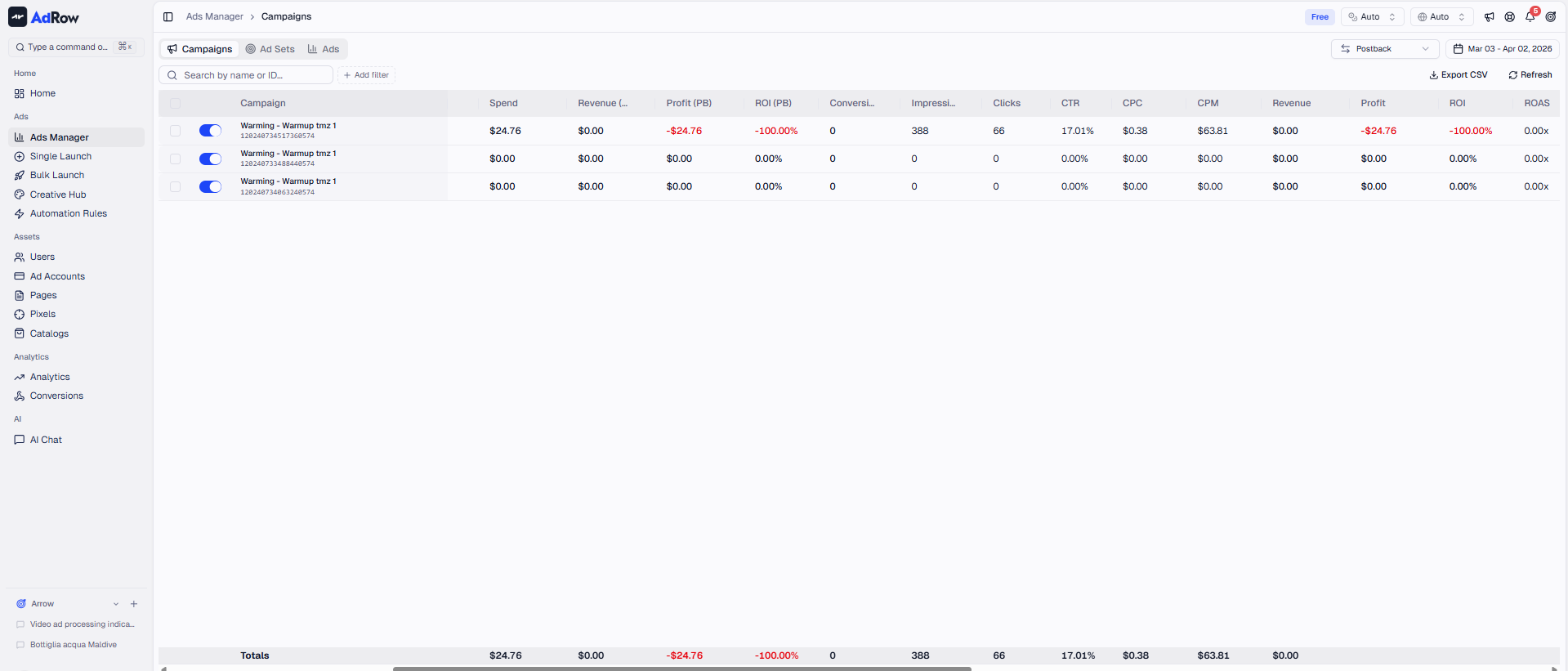
These totals represent ALL matching items, not just the currently visible page. This is important — if you have 200 campaigns but only see 50 on screen, the summary reflects all 200.
Comparing Metrics
To evaluate campaign health quickly, focus on these key metric combinations:
For e-commerce (Sales objective):
ROAS > 1x means you're profitable (before operating costs)
Cost per Purchase tells you acquisition cost
AOV helps you understand average ticket size
For lead generation (Leads objective):
Cost per Lead is your primary efficiency metric
CTR indicates creative quality
Frequency > 3-4 may signal audience fatigue
For traffic:
CPC shows content cost efficiency
CTR measures creative relevance
Inline Link Clicks (not total clicks) for true traffic volume
For awareness:
CPM is the key efficiency metric
Reach tells you audience size reached
Frequency should stay controlled (usually < 3)
Understanding Calculated vs Direct Metrics
Metrics marked "Calculated" are computed by Wevion from raw Meta data:
They update whenever the underlying data is refreshed
They respect your selected currency setting (all monetary values are converted)
They respect your selected timezone setting (daily aggregation boundaries shift)
Frequently Asked Questions
Q: Why is my ROAS showing as "—" or zero? A: ROAS requires both Spend and Purchase Value to be greater than zero. If Meta hasn't tracked any purchases (or your pixel isn't firing purchase events), ROAS will show as zero or empty.
Q: Why do Meta conversions and Postback conversions differ? A: This is normal and expected. Meta uses its own attribution model (view-through + click-through with configurable windows). Your tracking system likely uses a different attribution model (usually last-click). Discrepancies of 10-30% are common. [See: ART-218]
Q: What does "Frequency: 5.2" mean? A: Each person in your audience has seen your ad an average of 5.2 times. High frequency (>3-4) can indicate audience fatigue — consider expanding your audience or refreshing your creatives.
Q: Are these metrics real-time? A: No. Metrics are synced from Meta periodically (approximately every 15 minutes). Meta itself reports data with some delay (usually 15-30 minutes). For the most current numbers, use the manual refresh option.
Q: Why do I see "Unattributed Conversions" in my postback totals? A: Unattributed conversions are postback events where the campaign, ad set, or ad ID couldn't be matched to a known entity. This can happen if the tracking parameters weren't passed correctly. [See: ART-218]
Q: Can I customize which columns are visible? A: Yes. Use the column visibility toggle in the table header to show or hide specific metrics based on your workflow needs.