EU Compliance — DSA Fields and Special Ad Categories
Last updated: April 18, 2026
If you're targeting EU audiences or advertising in regulated categories, you need to comply with specific Meta requirements. Wevion enforces these rules automatically to prevent rejected ads and policy violations.
Prerequisites
Understanding of the Campaign Launcher Campaign Launcher Overview — How It Works
Knowledge of your target countries
How It Works
Two compliance frameworks affect your campaigns:
Digital Services Act (DSA) — EU regulation requiring transparency about who benefits from and pays for ads shown in EU countries
Special Ad Categories — Meta's classification for sensitive advertising topics that require additional restrictions
Wevion validates both automatically during campaign setup and will block publishing if required fields are missing.
DSA (Digital Services Act)
What Is DSA?
The Digital Services Act is an EU regulation that requires all ads shown to EU residents to include information about:
Who benefits from the ad (the beneficiary)
Who pays for the ad (the payor)
This information is visible to users who click "Why am I seeing this ad?" on Meta platforms.
When DSA Fields Are Required
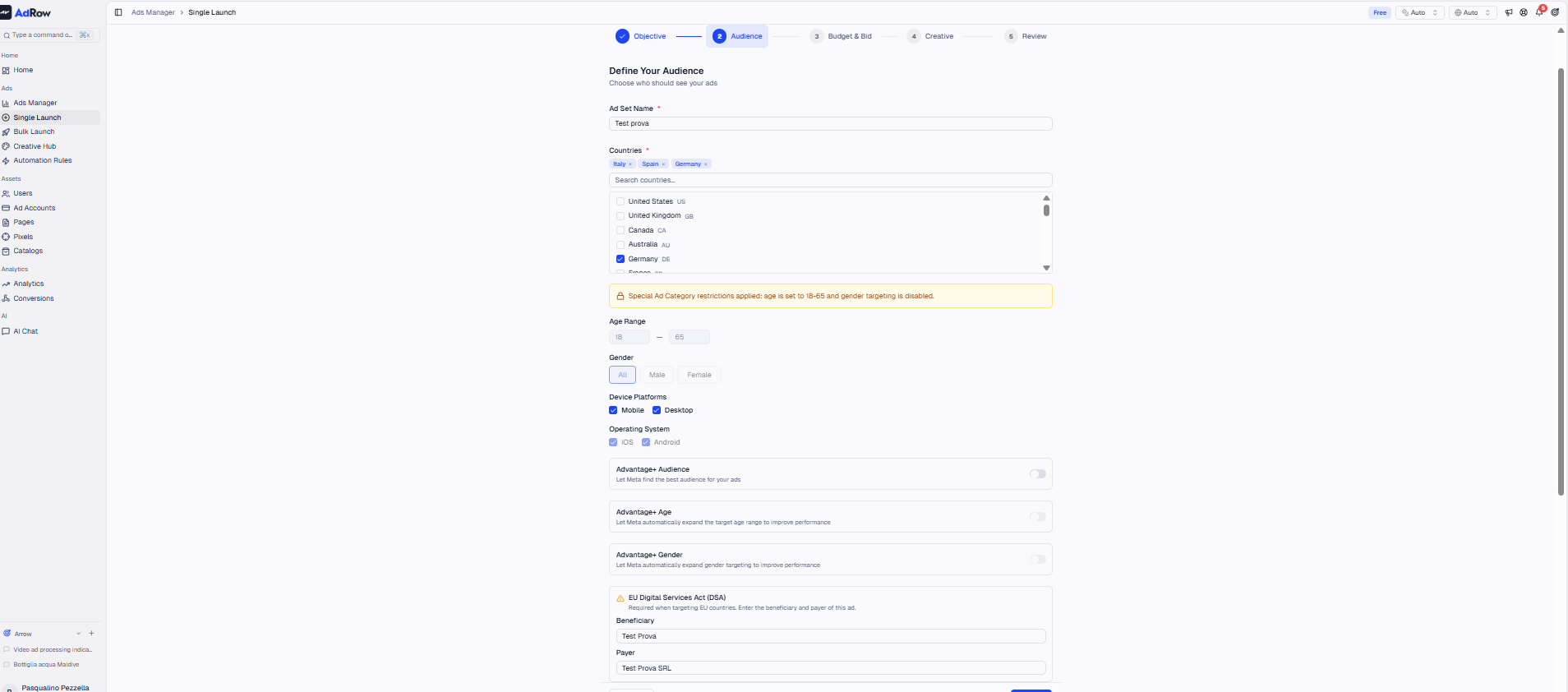
Wevion checks if any country in your ad set's target countries is an EU member state. If yes, both DSA fields become mandatory.
The 27 EU member states are: Austria, Belgium, Bulgaria, Croatia, Cyprus, Czech Republic, Denmark, Estonia, Finland, France, Germany, Greece, Hungary, Ireland, Italy, Latvia, Lithuania, Luxembourg, Malta, Netherlands, Poland, Portugal, Romania, Slovakia, Slovenia, Spain, Sweden.
DSA Fields
FieldDescriptionExample | ||
DSA Beneficiary | The entity that benefits from the ad being shown | "ACME Corp" or "Mario Rossi" |
DSA Payor | The entity paying for the ad | "ACME Corp" or "Marketing Agency XYZ" |
These fields are set at the ad set level in the Campaign Launcher.
Step-by-Step
In the Campaign Launcher, configure your ad set
Select one or more EU countries in the Countries field
The DSA Beneficiary and DSA Payor fields become required (highlighted)
Enter the beneficiary name (who benefits)
Enter the payor name (who pays)
If the same entity benefits and pays, enter the same name in both fields
Tip: In most cases, the beneficiary and payor are the same entity — your company or the brand being advertised.
Special Ad Categories
What Are Special Ad Categories?
Meta requires advertisers to declare when their ads relate to certain sensitive topics. Selecting a special category applies additional targeting restrictions to prevent discrimination.
Available Categories
CategoryDescriptionTargeting Restrictions | ||
Financial Products & Services | Ads for credit, insurance, banking, loans, investment | Min age 18+, some targeting restrictions |
Employment | Job listings, career opportunities | Min age 18+, limited demographic targeting |
Housing | Real estate, rentals, housing services | Min age 18+, limited demographic targeting |
Issues, Elections & Politics | Political ads, social issues, election content | Min age 18+, additional disclaimers required by Meta |
Online Gambling & Gaming | Gambling, betting, casino, fantasy sports | Min age 18+, geo-restrictions may apply |
Note: As of January 2025, Meta renamed the "Credit" category to "Financial Products & Services."
Impact on Targeting
When you select a Special Ad Category, Wevion automatically enforces:
Minimum age 18 — If you set a lower minimum age, validation will block publishing
Additional Meta restrictions — Meta may limit certain targeting options at the API level (e.g., no targeting by zip code for Housing ads)
Step-by-Step
In the Campaign Launcher, locate the Special Ad Category field in the campaign row
Select the appropriate category (or "None" if not applicable)
If you select a category, ensure your ad set's minimum age is 18 or higher
Wevion validates this before publishing — you'll see an error if the age is too low
When to Select "None"
Most advertising campaigns don't fall into a special category. Select "None" unless your ad specifically promotes:
Financial products (credit cards, loans, insurance)
Job opportunities
Real estate or rental properties
Political or social issue content
Online gambling, betting, or gaming
Warning: Incorrectly categorizing your ads (or failing to categorize regulated ads) can result in Meta rejecting your ads or disabling your ad account. When in doubt, select the appropriate category.
Combining DSA and Special Categories
If you're running a financial services campaign targeting EU countries, you need both:
Special Ad Category set to "Financial Products & Services"
DSA Beneficiary and Payor fields filled in
Minimum age set to 18+
Wevion validates all of these together before allowing you to publish.
Frequently Asked Questions
Q: Do I need DSA fields if I'm targeting the UK? A: No. The UK is not an EU member state. DSA only applies to the 27 EU member states. However, the UK may have its own advertising regulations.
Q: What happens if I target both EU and non-EU countries? A: DSA fields are still required because your ad will be shown to people in EU countries. Meta applies the DSA labels to impressions served in EU countries.
Q: Can I leave DSA fields empty and fill them later? A: No. Wevion validates DSA fields before publishing. If any EU country is selected, both fields must be filled in before you can publish.
Q: Who should I put as the beneficiary? A: The entity that directly benefits from the ad. This is usually:
Your company (if advertising your own products)
Your client's company (if you're an agency running ads for a client)
Q: What if my ad doesn't fit any special category? A: Select "None." Only choose a category if your ad specifically falls into one of the regulated areas.
Q: Will Meta check my special category selection? A: Meta's review team may flag ads that should have a special category but don't. If your ad is about housing, employment, or financial products, always declare the category to avoid rejection.